Sovereign Mesh Security Architecture The Watchtower Protocol and Physical-First Defense
1. The Paradigm Shift: From Network Perimeters to Kinetic Resilience
Traditional security models are predicated on the luxury of a climate-controlled datacenter. In a “Kinetic Environment,” where the primary threats are dust, extreme heat, vibration, and electromagnetic pulses (EMP), software-defined security is a secondary concern. If the physical hardware fails, the perimeter ceases to exist. At DeReticular Academy, we operate under a “Physical-First” posture, recognizing that the RIOS-CC-1000 is not a server—it is a survival tool. True resilience begins with hardware that can sustain operations in total isolation from global infrastructure.
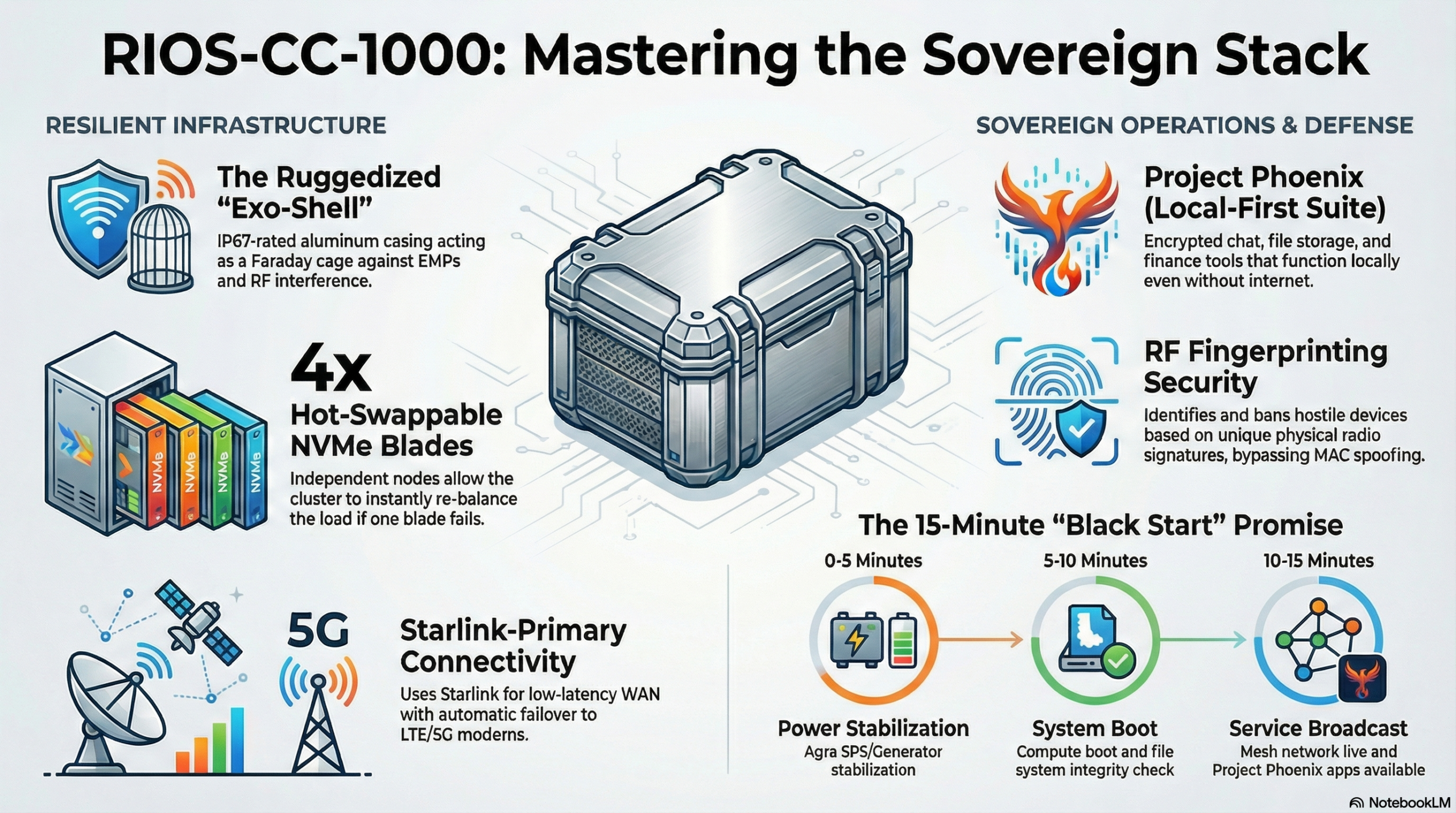
The RIOS-CC-1000 diverges from traditional architecture through its IP67-rated aluminum “Exo-Shell.” This chassis functions as a foundational Faraday cage, shielding the Sovereign Stack from light EMPs and radio-frequency interference. Critically, the unit lacks traditional external fans—mechanical failure points that invite dust and moisture. Instead, it utilizes a “Positive Pressure Cycle Cooling” system. This design requires a non-negotiable field maintenance schedule: intake filters must be inspected and cleared every 30 days to maintain the internal pressure differential.
The Philosophy of Ruggedization
| Feature | Old World (Fragile) | New World (Resilient) |
| Operational Posture | Climate Controlled Dependency | Kinetic Environment Ready (Dust, Heat, EMP) |
| Physical Defense | Exposed Ports/Vulnerable Housing | IP67 “Exo-Shell” (Aluminum Faraday Cage) |
| Power Integrity | Grid Reliant / Centralized | Self-Sustaining (Agra Generator/Solar Integrated) |
| Thermal Strategy | External Liquid or Traditional Fans | Positive Pressure Cycle (No External Fans) |
| Maintenance | Specialized Technicians Required | Field-Serviceable (30-Day Filter Cycles) |
With the physical domain secured by the Exo-Shell, the architecture projects its defensive perimeter into the radio-frequency spectrum via the Watchtower Protocol.
——————————————————————————–
2. The Watchtower Protocol: Radio Frequency (RF) Fingerprinting
The Watchtower Protocol serves as the primary defensive gatekeeper for the Sovereign Mesh. It shifts identity verification from spoofable software identifiers, such as IP or MAC addresses, to the unique physical properties of a device’s RF signature. By identifying the specific radio waveform emitted by a device’s hardware, the RIOS-CC-1000 ensures that identity is anchored in the physical world, making digital impersonation mathematically and physically impossible.
RF Fingerprinting is the ultimate deterrent against lateral movement. Even if an adversary successfully spoofs a known MAC address, the Watchtower Protocol detects the discrepancy in the signal source’s physical profile. This allows the system to identify the hardware’s unique “fingerprint” and prevent an intruder from navigating the mesh. This protocol is the gatekeeper of the “Zero-Trust Bubble,” ensuring that only physically verified hardware interacts with civilization-critical services.
Device Categorization & Access Control
| Category | Definition | Access Level | Requirement |
| Green List | Verified community hardware. | Full Mesh & Sovereign App Access | Continuous RF Validation |
| Grey List | Unknown/Guest devices. | Isolated External Link Only | Mandatory Physical KyC |
| Red List | Hostile signatures (Jamming/Spoofing). | Immediate Physical Disassociation | None (Permanent Ban) |
Note: Transitioning a device from Grey to Green is a procedural gate requiring “Physical KyC” (Know Your Client) to verify the owner’s identity in person.
Technical Workflow: Hostile Identification and Ban
In the event of an alert indicating “High Volume Login Attempts” or “MAC Spoofed,” the Administrator must execute the following:
- Spectrum View: Switch the dashboard to “Spectrum View” to visualize the RF environment.
- Triangulate: Identify the signal source (e.g., triangulated to a physical location like the “North Gate”).
- Identify: Isolate the unique RF Signature ID of the intruder.
- Execute Ban: Utilize the
rios-secCLI to initiate physical disassociation.- Command:
rios-sec ban --rf-sig [Signature_ID] --duration permanent
- Command:
This disassociation maintains the integrity of the Zero-Trust Bubble by barring the physical source at the hardware level.
——————————————————————————–
3. Engineering the Zero-Trust Bubble: Sovereign Mesh Connectivity
The “Zero-Trust Bubble” is a self-healing, sovereign network that operates independently of the local grid. It is built on the premise that no internal device is inherently trustworthy. By enforcing strict Client Isolation, the RIOS architecture ensures that Client X cannot see Client Y. This containment strategy prevents lateral malware movement, ensuring that a single compromised device cannot threaten the broader community ledger or communication channels.
The Sovereign Mesh is designed for kinetic resilience. If a specific node is lost—for example, if a storm disables the North Node—the system automatically reroutes traffic between the South Node (Clinic) and the East Node (School). In scenarios where a “Dead Zone” is created, Administrators can deploy a mobile unit or drone in “Relay Mode” to bridge the gap.
- Relay Command:
rios-mesh link --target [Repeater_ID] --bridge - Metric: A successful link must maintain a stabilized latency below 50ms.
SOP-NET-01: The Starlink Bridge and Failover
The Sovereign Mesh uses Starlink as its primary WAN for low-latency independence. To maintain the bubble’s integrity, follow SOP-NET-01:
- Bypass Mode: The Starlink router must be set to “Bypass Mode” in the Starlink App, forcing the RIOS-CC-1000 to handle all routing and security.
- Failover Logic: 5G/LTE Modems are configured as “Failover Only” secondary WANs.
- Command:
rios-cli net configure --primary wan1 --secondary wan2 --mode failover
Ensuring high availability at the network edge is the prerequisite for protecting the internal data assets and encryption keys within the compute core.
——————————————————————————–
4. Integrity Management and the Encryption Key Safeguard
Data at rest is protected by the Seal Integrity system, a hardware-software handshake that monitors the physical state of the chassis. The protection of local encryption keys is directly tied to the physical security of the unit.
Maintenance Mode and Intrusion Detection
The “Seal Integrity” light is a critical security indicator. When this light is Green, the chassis is sealed and the active intrusion detection system is armed.
- Warning: Opening the chassis while the Seal Integrity light is Green triggers the intrusion detection system, which will immediately lock the local encryption keys to prevent data exfiltration.
- Maintenance Mode: Administrators must engage Maintenance Mode via the dashboard before any physical intervention to safely suspend the IDS.
SOP-HW-01: Hot-Swap Protocol
In the event of a “Blade Drive Failure” alert, follow the SOP-HW-01 protocol to replace one of the four NVMe-native compute blades without powering down the cluster:
- Prepare: Navigate to Hardware > Blade [X] > Storage and select “Prepare for Removal.”
- Wait for Solid Blue: Do not remove the blade until the physical LED turns SOLID BLUE. This ensures the data write cache is flushed to the parity drive, preventing data corruption.
- Swap: Unlock the cam-lever, slide out the sled, and insert the new unit.
- Verify: Confirm the “Rebuilding Array” status on the dashboard.
Local-First Integrity
Administrators use rios-vault status to monitor encryption health. In the “Local-First” paradigm, services such as Matrix and Nextcloud remain fully functional offline. When the satellite uplink is restored, use the following to synchronize the local ledger:
- Command:
rios-sync force(Initiates immediate encrypted sync to off-site storage).
——————————————————————————–
5. Disaster Recovery: The “Black Start” and 15-Minute Promise
The “15-Minute Promise” is our strategic SLA: civilization-critical services (communication, finance, and storage) must be restored within a quarter-hour of total darkness. This is achieved through the Black Start procedure, designed for recovery from catastrophic system failure.
The Red Card: Emergency Reboot Procedure
- Isolate: Disconnect all WAN cables (Starlink and Grid).
- Power: Verify that the Agra Dot Energy Generator is stable at 60Hz to prevent hardware damage.
- Boot: Insert the physical Master Key USB into Port 0.
- Engage: Hold the Physical Reset Button for 10 seconds.
- Listen: Wait for the “Heartbeat” beep code: 3 short beeps, 1 long beep.
- Broadcast: The system will automatically broadcast the SSID “SOS_BEACON.”
The 15-Minute Restoration Timeline
- 0-5 Minutes: Power Stabilization (Agra SPS/60Hz verification).
- 5-10 Minutes: Compute Boot and File System Integrity/Parity Checks.
- 10-15 Minutes: Mesh Network Broadcast and Sovereign App Availability.
Once the system is stable, the administrator must run rios-phoenix restore --latest to finalize the state. By adhering to these protocols, the RIOS Administrator ensures that the Sovereign Stack remains a resilient, immutable ecosystem, capable of maintaining civilization-critical services regardless of the external environment.